


© 2010 - 2026 SouthBit Data Recovery, Studio 109, Palmyra Junction, 9 Palmyra Road, Claremont, 7708, 021 205 1119
NVMe M.2 SSD Data Recovery
NVMe M.2 SSD drives are the fastest storage technology in modern laptops and desktops. They are generally reliable if from a reputable brand, but do have a finite lifespan. Budget models and brands are notorious for early failures. When they fail, the recovery process is significantly more complex than a conventional SSD or hard drive. At our Cape Town lab we use the PC-3000 data recovery system, alongside micro-soldering equipment, to recover data from failed NVMe drives across all major brands and controller families.

For many years, laptops and desktops used SATA SSDs, the same interface that was originally designed for traditional spinning hard drives. NVMe (Non-Volatile Memory Express) changed this entirely. Rather than passing data through a SATA connection, NVMe drives plug directly into the motherboard’s PCIe (PCI Express) bus, the same high-speed channel used by graphics cards.
The result is dramatically higher performance. A modern SATA SSD tops out at around 550 MB/s whilst a PCIe Gen 4 NVMe drive reads at over 7,000 MB/s — more than twelve times faster. PCIe Gen 5 drives push past 12,000 MB/s. Almost every laptop and desktop sold since 2020 ships with an NVMe drive as its primary storage, most commonly in the compact M.2 form factor, a small stick roughly the size of a stick of gum.
In terms of failures the most common faults are:
- Controller failure
- Degraded NAND
- Firmware/FTL corruption
- Electronic component failure on PCB
- PMIC or power circuit failure
Let’s run through the data recovery process of a faulty Kioxia NVMe M.2 SSD drive. This particular drive was sent to us with DHL from outside of South Africa, as the client insisted on using a professional data recovery lab which wasn’t available in his country. The drive arrived completely unresponsive, no detection in an NVMe slot or adapter. The first step was to check how much power the NVMe was drawing, and the thermal signature which would highlight faulty or shorted electrical components.

We place the NVMe under the thermal camera, power it up and monitor the temperature across the board. We clearly see that one component is heating up very quickly to 100 degrees celcius which indicates a short on the PCB itself. The tricky part is identifying the actual fault itself, as the component which is heating up is just the first component on that power line. We test that component and it’s OK, the actual fault is elsewhere on the NVMe PCB.
An effective method of fault finding a short is to inject voltage to the area that has the short. The faulty component itself will then heat up which will allow us to identify where the problem is. Let’s inject voltage of 1.0v into the PCB.

As soon as we inject voltage into the affected area, a different component lights up under the thermal camera. This is our problem, a capacitor that has shorted to ground and is the reason that the NVMe is not responsive.
Now that we have identified the exact area and component, let’s have a look under the microscope. We’ll check for obvious signs of damage or problems, take some more measurements and then remove the faulty capacitor.

All of the components marked with a pink dot were testing shorted to ground during out initial tests, and only by injecting voltage where we able to determine which one was faulty. As it happens, the second capacitor down on the left side had shorted to ground, therefore taking the whole NVMe drive down with it. Let’s remove this shorted capacitor and test the drive once this is done.
For the sake of data recovery it’s not required to replace this capacitor, the NVMe will function just fine without it.
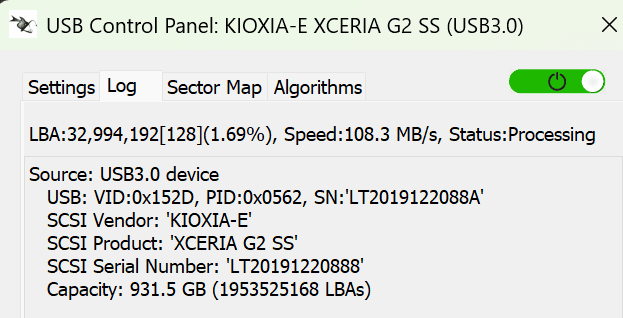
Now that the faulty component has been removed, we connect the NVMe up to Deepspar Stabilizer and the drive initialises perfect. Some basic tests are performed and read speeds are inconsistent, anything from a few megabytes per second to a few hundred. Some modifications are made to get the drive running in a stable manner. Once that is done we can use Data Extractor which is part of PC-3000 to access and recover the data.

We see that that NVMe is encrypted with Bitlocker so we’ll decrypt the partition with the password that was provided by the client. We then start to clone the drive, starting with the most important data first.
In the end we get a 100% successful data recovery from the faulty NVMe drive, a fantastic result.
How NVMe Data Recovery Works at Our Lab: PC-3000 and Micro-Soldering
NVMe data recovery is an electronics and firmware discipline at its core. Unlike hard drive recovery, which involves mechanical components, cleanrooms, and head transplants, NVMe recovery happens at the circuit board and firmware level. No cleanroom is required: the NAND memory chips are sealed inside their BGA packages at the factory and never exposed to air during the recovery process. What matters is having the right diagnostic tools and knowing how to use them.
At our Cape Town lab, all NVMe recovery work flows through two core capabilities: the PC-3000 data recovery system and micro-soldering.
PC-3000 and What It Does
The PC-3000 by ACE Laboratory is the industry-standard professional data recovery platform. It communicates with the NVMe drive's controller at a level far below what any operating system can reach, directly through the controller's diagnostic interface, bypassing the normal host protocol entirely.
When an NVMe drive arrives at our lab, the PC-3000 allows us to place the controller into a special diagnostic state called Technological Mode. From here we can read the drive's service area, inspect the health of the NAND chips, assess the firmware translation layer, and determine whether the fault is logical (firmware/FTL) or physical (electronics). This is always the starting point, and it tells us exactly what recovery path the drive needs before any work begins.
For drives with firmware or FTL corruption, the PC-3000 allows us to inject a working firmware loader into the controller's memory, rebuild the flash translation layer from surviving metadata on the NAND chips, and then image the drive sector-by-sector in a read-only mode that does not disturb the underlying data.
Micro-Soldering for Physical Failures
Where the fault is electrical, such as a shorted PMIC, a failed voltage regulator, or a cracked BGA solder joint under the controller, we use micro-soldering to repair the drive's circuit board before any firmware work can begin. This is the step that separates a professional lab from a software-only recovery service.
The process starts with thermal imaging to locate the fault on the PCB without applying full power to a potentially shorted board. We can identify a shorted component within seconds by the heat it generates when a small current is applied. Once found, the failed component is removed and replaced under magnification, and the voltage rails are verified with a bench power supply before the drive is reconnected.
For NVMe drives specifically, micro-soldering is required more often than on SATA SSDs, because the higher power demands of the PCIe interface put the power management circuitry under significantly more stress. A failed PMIC is a common failure mode on NVMe drives, particularly after a power surge or a faulty power adaptor.
A Note on Hardware Encryption
Every modern NVMe controller implements hardware AES-256 encryption automatically. The encryption key is generated inside the controller chip at the factory and never leaves it. This means that even if the NAND chips were physically removed from the drive, the data on them would be completely unreadable, just encrypted ciphertext with no accessible key.
This is why NVMe physical recovery always aims to revive the original controller rather than swap it for a donor. A donor controller from an identical drive model has its own unique encryption key burned into its silicon, which cannot unlock the data on your NAND chips. Our micro-soldering work is directed entirely at keeping the original controller alive so it can perform its own decryption. Find out more about recovering data from encrypted drives.
NVMe Failure Types We Recover
NVMe drives fail via the same broad mechanisms as SATA SSDs, namely controller, firmware, and NAND issues, but the higher power draw of the PCIe interface means physical board failures occur more frequently. Each failure type needs a different approach, and using the wrong method at the wrong time can permanently destroy access to the data.
Controller Failure
The NVMe controller manages all read/write operations and maintains the flash translation layer. When it fails, due to a power event, overheating, or a component fault on the board, the drive disappears from your system entirely or reports 0 bytes capacity. The data on the NAND chips is almost always intact; the path to it is simply broken. Recovery requires restoring power to the original controller or repairing its surrounding circuitry.
Firmware / FTL Corruption
The firmware translation layer (FTL) is the map that tells the controller where every piece of your data sits on the physical NAND chips. Corruption of this layer, most often caused by an unexpected power loss during a write operation, leaves the drive unable to locate its own data. It may still be detected but show the wrong capacity, 0 bytes, or a factory identity string instead of its real model name. We use the PC-3000 to rebuild the FTL from surviving NAND metadata.
Not Detected in BIOS
An NVMe drive that is completely invisible to the system, not showing in BIOS or Device Manager, is one of the most common failure presentations we see. This typically points to a dead controller, a failed PMIC, or a shorted component on the PCB. Diagnosis via thermal imaging and the PC-3000 determines whether the fault is physical or firmware-based before any recovery work begins.
PMIC / Power Circuit Failure
The power management IC (PMIC) regulates the voltages that power the controller and NAND chips. NVMe drives draw significantly more power than SATA SSDs, up to 13W under load, making the power circuit particularly vulnerable to surges and power interruptions. The drive gets hot immediately, may emit a faint burning smell, and stops being detected. This is a physical electronics fault that requires micro-soldering to resolve before any data work can begin.
NAND Wear / Bad Blocks
Every NAND cell has a finite number of program/erase cycles before it starts losing its ability to hold a charge reliably. As cells wear out, the controller's error-correction system (ECC) works harder to compensate. When degradation exceeds the ECC threshold, read errors, system freezes, and sudden drive inaccessibility follow. We use the PC-3000's multi-pass imaging capability, with adjusted voltage thresholds, to extract data from cells that standard reads can no longer reliably reach.
Water / Liquid Damage
NVMe drives exposed to liquid should not be powered on under any circumstances. Corrosion spreads quickly across the PCB and can destroy the controller or NAND chips permanently. We assess liquid-damaged NVMe drives before applying any power, cleaning and evaluating the board under magnification before settling on the correct recovery path.
Logical Failure / Accidental Deletion
Accidentally deleted files, formatted drives, or corrupted file systems on a physically healthy NVMe drive. On NVMe drives the TRIM command runs near-instantly in the background, which means deleted data can be permanently erased within seconds. The sooner you stop using the drive and get in touch, the better the outcome. Find out more about why SSD and NVMe recovery is harder than HDD recovery.
Physical Damage (Drop / Impact)
A dropped laptop or a physical impact can crack PCB traces, fracture the BGA solder joints under the controller, or damage the M.2 edge connector. These faults sever the electrical path between the NAND and the host system but leave the data itself untouched. Micro-soldering under magnification can repair broken traces and reflow fractured joints, restoring controller access for imaging.
Why NVMe Recovery is More Complex Than SATA SSD Recovery
NVMe drives draw significantly more power than SATA SSDs, making physical board failures more common. They also run TRIM and garbage collection near-instantly, which shrinks the window for logical data recovery to seconds rather than minutes. Recovery requires either repairing the flash translation layer via PC-3000 firmware tools, or micro-soldering the PCB to revive the original controller, which must stay functional because hardware encryption ties the decryption key to that specific chip.
When a SATA SSD fails, the most common root cause is firmware corruption, typically from a power loss during a write operation, and the board-level components are relatively lightly stressed at 2–4W. NVMe drives operating at 8–13W under PCIe Gen 4 or Gen 5 loads put the power management circuitry under much greater stress, which is why physical PMIC and board failures are a more frequent presentation on NVMe cases in our lab. If you have a standard SATA SSD rather than an NVMe drive, you can read more about SSD data recovery here.
The encryption architecture adds a further constraint: the AES-256 media encryption key is bound to the specific controller silicon that generated it. A donor controller from an identical drive cannot decrypt the data. This rules out chip-off NAND extraction, which is sometimes viable on older unencrypted drives, as a recovery path on any modern NVMe drive. The original controller must be kept alive, which is why micro-soldering capability is not optional for professional NVMe recovery work.
Our Step-by-Step NVMe Recovery Process
- Free assessment and written quote: The drive arrives at our Cape Town lab and is connected to the PC-3000 for initial diagnostics. We assess controller response, NAND configuration, power rail status, and firmware health. You receive a written quote within 24 hours. No assessment fee, and no charge if we cannot recover your data.
- Physical fault resolution (where required): If the drive has an electrical fault, such as a shorted component, failed PMIC, or damaged trace, we use thermal imaging and micro-soldering to repair the circuit board and restore power to the controller. Voltage rails are verified on a bench power supply before we proceed.
- Firmware and FTL repair via PC-3000: With the controller responsive, we enter Technological Mode and rebuild the flash translation layer if it has been corrupted. This restores the drive's ability to map its physical NAND addresses to logical data locations, making the data accessible again.
- Sector-by-sector imaging: The drive is imaged in read-only mode through the PC-3000. We always work from a forensic image rather than the original drive, protecting the source data throughout. Degraded NAND areas are handled with multi-pass reads and adjusted voltage thresholds to extract as much data as possible.
- Verification and delivery: We verify the recovered data and provide a file listing for your confirmation before delivery. Your data is returned on a new storage device or via secure download link.
What Your NVMe Symptoms Mean
Most clients come to us having already noticed one of the symptoms below. Use this as a quick guide to understand what is likely going on with your drive, and what to avoid doing in the meantime.
| Symptom | Likely cause | What to do |
|---|---|---|
| Drive not detected in BIOS at all | Dead controller, shorted PMIC, or failed power circuit | Power off immediately. Do not power on again. Contact us. |
| Detected but shows 0 GB or wrong capacity | FTL corruption, controller cannot map its own data | Do not attempt formatting or recovery software. Send to us. |
| Shows an unfamiliar model name | Controller has reset to a factory identity, firmware panic | Power off. Do not run diagnostics. Contact us. |
| Drive gets very hot or has a burning smell | Shorted component drawing excessive current | Power off immediately. Do not reconnect. Contact us. |
| Frequent freezes or crashes when drive is in use | NAND degradation, ECC error rate nearing its limit | Back up immediately if possible. Contact us before it gets worse. |
| Files deleted or drive accidentally formatted | Logical loss, TRIM may have already erased the data | Stop using the drive immediately. Contact us as soon as possible. |
| Damage from a drop or liquid exposure | Physical PCB damage, cracked traces or corroded components | Do not power on. Package carefully and contact us. |
NVMe Brands and Models We Recover
Different NVMe drives use different controller chipsets, and the controller family determines both how the drive fails and what recovery approach is needed. We work with all major brands and controller families including:
- Samsung 970 EVO, 970 EVO Plus, 980, 980 Pro, 990 Pro: Samsung uses its own in-house Elpis and Pascal controllers, which are not firmware-accessible via PC-3000. Recovery depends on micro-soldering to revive the original controller. The 980 Pro and 990 Pro have a well-documented history of unexpected firmware-related health decline and sudden inaccessibility.
- WD Black SN750, SN770, SN850, SN850X: Western Digital NVMe drives use a custom in-house controller. Failures typically follow power events or extended heavy workloads and tend to present as the drive disappearing from BIOS without any prior warning.
- Seagate FireCuda 510, 520, 530: The FireCuda range uses Phison controllers (E12, E18), which are well-supported by the PC-3000. Firmware-level recovery is available for most failure modes on these drives.
- Crucial P2, P3, P5, P5 Plus: The P2 and P3 use QLC NAND, which has a lower endurance rating and smaller per-cell voltage margin, making NAND degradation recovery more technically demanding. The P5 Plus uses TLC NAND with a Phison controller and is more amenable to firmware-level recovery.
- Kingston KC2500, KC3000, NV2: Kingston's higher-end NVMe drives use Silicon Motion (SMI) and Phison controllers, both well-supported by the PC-3000. Failures on these drives tend to be sudden rather than preceded by any performance warnings.
- SK Hynix Gold P31, Platinum P41: SK Hynix uses its own NAND and controllers. Failures are less frequent but typically present as controller-level issues rather than NAND degradation.
- Sabrent Rocket 4 Plus, Rocket 5: Phison E18-based drives popular in high-performance workstations and gaming builds. PC-3000 firmware recovery is available for most failure cases.
We also recover NVMe drives from Lexar, Corsair, ADATA, PNY, TeamGroup, and most other brands. The key factor is always the controller chipset, as many brands use the same Phison or Silicon Motion controllers under their own labels. We keep our PC-3000 software current to support the latest controller families as they come to market.
Power Surges, Outages, and NVMe Drive Failures
A power cut during active use, particularly while the operating system is performing write operations, is one of the most common causes of NVMe failure we see. It can corrupt the firmware translation layer instantly and in some cases cause PMIC failure on the drive's board. Desktop users are strongly advised to run a UPS (uninterruptible power supply). If your NVMe drive failed during a power outage, do not keep powering it on. Read more about power surges and drive damage here.
NVMe, SSD, and Hard Drive Data Recovery: We Cover All Storage Types
NVMe is the latest generation of storage technology, but data loss happens across all drive types. If you are not sure whether you have an NVMe, a SATA SSD, or a traditional hard drive, we can help regardless. We perform SSD data recovery on SATA and M.2 SATA drives, and hard drive data recovery on all makes and capacities of spinning drives, including laptop drives, desktop drives, and external hard drives.
Pricing and How to Get Started
Every NVMe recovery starts with a free assessment. Your drive is evaluated within 24 hours of arriving at our Cape Town lab and you receive a written quote before any work begins, with no surprises and no obligation. You only pay if we successfully recover your data. If you want a rough idea of costs beforehand, you are welcome to view our price list, though the final quote always follows the free assessment as the correct pricing tier depends on the specific failure your drive presents with.
Various Types of NVMe Data Recovery Methods
Different manufacturers use different controller architectures and proprietary FTL algorithms, so each drive is unique in the approach required to recover the data. We keep our tools and methods current for all NVMe drives on the market. If you need data recovery from an NVMe or M.2 SSD, give us a shout.
