


© 2010 - 2026 SouthBit Data Recovery, Studio 109, Palmyra Junction, 9 Palmyra Road, Claremont, 7708, 021 205 1119
Data recovery in Durban: why it matters and who to call
Losing important files is stressful, whether it’s family photos, business records or backups needed for everyday operations. For people and companies in Durban, quick access to reliable data recovery in Durban is essential to minimise downtime and secure irreplaceable information. Southbit Data Recovery specialises in recovering data from failed hard drives and other storage devices, and we help Durban clients by offering clear diagnostics, secure handling and practical advice. When a drive fails, the first hour of response matters: avoiding needless power cycles and preserving the device in its current state increases the chance of a successful recovery. This article explains the mechanical basics of hard drives, the main reasons they fail, how professional recovery works, and how Southbit Data Recovery supports local customers in Durban with expert services and secure workflows.

How hard drives store information and why that matters
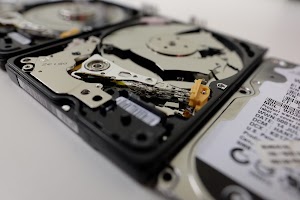
A mechanical hard disk drive stores data on spinning platters coated with a magnetic surface. Tiny read/write heads float mere nanometres above those platters to magnetically record and retrieve bits as the platters spin at thousands of revolutions per minute. The drive’s actuator positions the heads precisely while firmware and electronics manage address mapping and error correction. Because reading and writing depend on moving parts and precise tolerances, physical shocks, dust contamination, or wear over time can cause failures. Unlike solid-state drives, where data is stored electronically, hard drives rely on mechanical alignment; that means problems like head degradation or motor failure directly prevent access to stored data. Understanding this physical architecture helps explain why certain symptoms — strange clicking, failure to spin, or sudden unreadable sectors — suggest mechanical issues that demand professional attention rather than DIY attempts.
Common failure modes of hard drives explained
Hard drives stop working for a few recurring reasons and knowing the difference helps prioritise recovery steps. Logical failures occur when the file system or partition table is corrupted by software bugs, unexpected power loss or accidental formatting; in these cases the magnetic data often remains intact and can be retrieved through careful imaging and metadata reconstruction. Physical failures include head crashes where the read/write heads contact the platter surface, seized spindle motors that prevent rotation, or PCB and component damage from electrical surges. Firmware corruption and service-area damage are another tough category: the drive’s internal microcode or mapping tables become unreadable and the drive no longer knows where to find data. Environmental events such as liquid spills, fire or contamination add complexity and can convert a recoverable situation into a more urgent, high-risk job. Distinguishing these modes early informs whether a safe imaging process is possible or whether cleanroom repairs are required.

How professional hard drive data recovery works at Southbit Data Recovery
When a customer brings a failed drive to Southbit Data Recovery, the process begins with a careful intake and non-invasive diagnostics that identify symptoms and priority files. The lab documents the history and performs a visual inspection before any powered attempts, protecting the original media. Imaging is the central rule: technicians create a bit-for-bit copy of the drive using specialised hardware that performs controlled retries, logs errors and skips irrecoverable sectors so the original device is preserved. If imaging is blocked by mechanical or firmware faults, the case moves to cleanroom repairs where trained engineers perform component-level work such as PCB repair, head stack replacement or service-area restoration, using donor parts and calibrated tooling. Once a stable image exists, software specialists reconstruct partition tables, repair file system metadata and use file-carving techniques to recover files when metadata is lost. Recovered data is validated, delivered on secure media, and accompanied by a clear report of the work performed.
Reduce risk and choose the right partner for data recovery in Durban
Prevention is the simplest way to avoid emergency recovery: regular backups, off-site copies and monitoring device health through SMART checks dramatically reduce the chance you’ll need a recovery service. When you do require expert help, choose a provider that pledges to image first, uses cleanroom facilities for mechanical work, and offers transparent assessments and quotes. Southbit Data Recovery serves clients across South Africa, including Durban, and focuses on secure handling, realistic success estimates and prompt communication. If your drive shows mechanical noises, won’t mount, or the system reports file corruption, power down the device and contact a professional rather than attempting risky DIY fixes. For reliable data recovery in Durban, swift action, the right expertise and professional labs are the difference between partial recovery and restoring everything that matters. Contact Southbit Data Recovery for a no-obligation assessment and immediate guidance.
